How to Flawlessly Track Billable Hours and Boost Profitability
To really get a handle on your billable hours, you need to think beyond just jotting down time. It's about building a system that proves the value you deliver, minute by minute. This means properly setting up your projects and rates, actually using a timer when you're deep in work, and then pulling all that data into clean reports for invoicing. It’s less about just logging hours and more about creating a rock-solid, verifiable record of your work that boosts your bottom line.
Why Nailing Your Billable Hour Tracking Is a Total Game Changer

It’s tempting to think that a "good enough" approach to time tracking is, well, good enough. But in my experience, "good enough" is a quiet way to kill your profits. The real damage doesn’t come from forgetting to log a whole day—it’s the slow, steady bleed from all the little things. A five-minute email here, a quick bug fix there, a brief client call... it all adds up.
Think about it: just 15 untracked minutes a day piles up to over 60 hours of unbilled work in a year. If you’re a contractor charging $100 per hour, that's a $6,000 hole in your pocket. This isn't just about lost cash; it's about fundamentally undervaluing your own expertise.
The Real Price of Sloppy Tracking
For any business selling its time, precision is everything. The legal profession figured this out a long time ago—their entire model is built on accounting for every six-minute chunk of time. You don't have to be a lawyer to see the wisdom in that. When your tracking is off, you start running into problems that quietly eat away at your business:
- Revenue Leakage: Those small, unbilled tasks are the number one culprit for lost income.
- Administrative Headaches: Every minute you spend trying to piece together your timesheet from memory or messy notes is non-billable time.
- Bad Project Estimates: Without accurate data from past projects, quoting new ones is a shot in the dark. This often leads to under-pricing your work and watching your margins shrink.
- Eroding Client Trust: Sending vague invoices with big, blocky hours can make clients question the bill, leading to disputes and payment delays.
Mastering how you track billable hours isn't just another admin task—it's the most direct lever you can pull to increase your profitability. It transforms time from a resource you spend into an asset you monetize.
That mental shift is key. When you adopt a system that makes precise time capture a natural part of your workflow, you stop leaving money on the table. It ensures every minute you spend creating value for a client is accounted for, documented, and ultimately, paid for. This isn't about working more hours; it's about getting paid for all the work you're already doing.
Right, let's get your workspace set up so that tracking your time feels like a natural part of your workflow, not another chore to dread.
Think of it like setting up your workshop before starting a big project. A little organization upfront saves you a massive headache later on and makes the whole process feel effortless. The idea is to make billing an automatic result of your work, not something you have to piece together from memory at the end of the month—we all know how that ends, usually with lost income.
Get Your Projects and Rates Dialed In
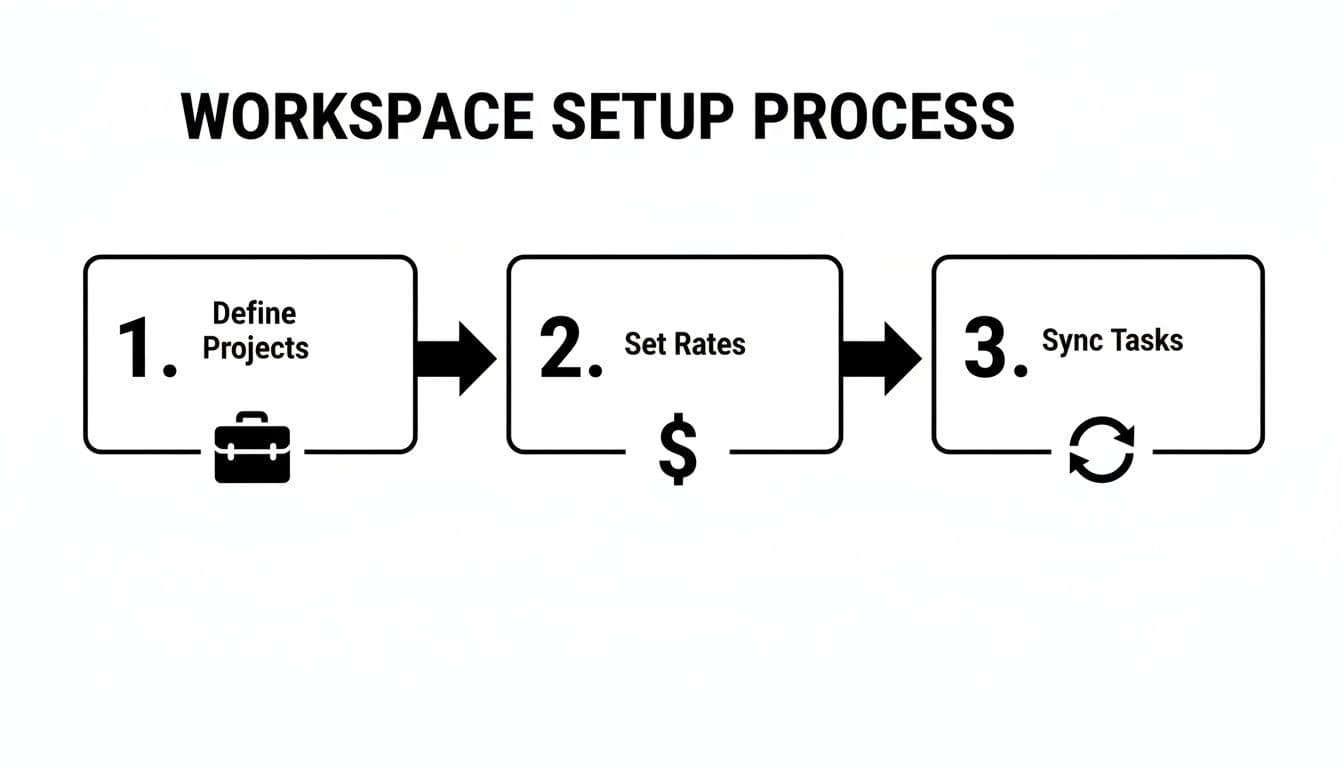
First things first, you need to define your projects. Don't just lump everything into a "Client Work" bucket. That's a recipe for confusion.
Instead, create specific projects for each client or major piece of work. For example, "Client X - Website Redesign" or "Client Y - Q3 Retainer." This kind of segmentation is the foundation for clean, accurate reporting down the line.
Once you have your projects, you need to assign a billable rate to each one. This is where you can be smart about your pricing. You might have a standard rate for one client but a higher, specialized rate for another that involves more complex tasks. I often create different projects for the same client, just with different rates.
- Project A: Strategy & Consultation ($150/hour)
- Project B: Development & Implementation ($125/hour)
Doing this ensures every minute you track is priced correctly from the get-go. No more manual calculations at the end of the month. It’s a simple change that pays off big time in accuracy.
For instance, when I onboard a new client, I'll immediately create a project like "Acme Corp - Mobile App" and lock in my rate at $140/hour. From that moment on, every focus session logged against that project automatically uses the correct rate.
Sync Your Tasks and Stop Doing Double Work
To really make time tracking disappear into the background, you have to connect it to your actual to-do list. If you're already using a tool like Jira or Linear, syncing your tasks is a total game-changer.
Imagine seeing a task like "JIRA-123: Fix login bug" pop up in your daily plan. With a proper integration, you just click a button and the timer starts.
This does two brilliant things for you. First, you're not manually re-creating tasks in two different places. Second, the task title—"JIRA-123: Fix login bug"—is automatically used as the description for your time entry. This adds immediate, crystal-clear context to your invoices, which clients love.
This kind of prep work isn't just about being tidy; it's a direct assault on lost billable time. The reality is that billing gaps are a huge problem in professional services. Lawyers, for example, only bill an average of 2.6 hours out of an 8-hour day. This stat should be a wake-up call for all of us. It shows just how much money is left on the table when we don't have a system that connects our focused work directly to our billing. You can read up on these legal sector productivity findings to see how these lessons apply across the board.
Alright, with your workspace configured, let's talk about the real magic: capturing every billable minute without feeling like you're constantly watching the clock. The key is to shift from active clock-watching to passive time tracking through guided focus sessions. The whole idea is to let you do your best work while the tracking happens automatically in the background.
It starts with one simple action: tying a timer directly to a specific task. Before you dive in, you just link your session to whatever you're working on. It could be a ticket from Jira for a new feature, a task from Linear, or even a quick personal note like "Draft client proposal." This small step provides all the context you'll need later.
The setup process we just covered—defining projects, setting rates, and syncing tasks—is what makes this all possible. It’s the foundation for making your focus sessions truly effective.
Let the System Do the Heavy Lifting
Once you kick off a focus session, a good tool will jump in to block distracting websites and apps for you. This is huge. It ensures the time you log is pure, high-value, productive time—not just time spent with a tab open. You're logging periods of deep work, not just punching a clock.
For anyone doing creative or technical work, this is a complete game-changer. The system handles the tedious tracking, freeing you up to concentrate on the actual problem you’re solving. It’s a frictionless way to gather accurate billable hours.
If you want to add more structure, you can even incorporate timed work-and-break cycles. Our guide on the Pomodoro Technique for enhanced productivity is a great resource for making these sessions even more powerful.
From Focused Work to Flawless Invoices
This automated approach completely eliminates the guesswork and administrative headache that comes with manual timesheets. Gone are the days of trying to piece your workday back together from memory, desperately trying to recall every five-minute phone call or quick email response.
Before we go further, it's worth highlighting just how different this is from the old way of doing things. Manually tracking time is riddled with problems that quietly eat away at your revenue and productivity.
Manual vs Automated Time Tracking
| Aspect | Manual Tracking | Automated Focus-Based Tracking |
|---|---|---|
| Accuracy | Prone to guesstimates, forgotten tasks, and rounding errors. | Captures every second automatically, ensuring precise records. |
| Productivity | Constant context-switching to start/stop timers drains focus. | Time is captured passively, allowing for uninterrupted deep work. |
| Client Trust | Vague time entries can lead to client disputes and questions. | Detailed, task-linked reports provide clear proof of work. |
| Revenue | Easily loses 10-15% of billable time to unrecorded small tasks. | Recaptures lost revenue by logging all work, big or small. |
| Effort | Requires daily administrative effort to reconstruct and log hours. | Zero administrative burden; tracking is a byproduct of working. |
This comparison makes it clear: moving to an automated, focus-based system isn't just about convenience—it's a strategic business decision.
The real power of this workflow is the integrity it brings to your billing. When a client receives an invoice built on focused, task-linked time, it builds immense trust. They see they aren't just paying for your time; they're paying for documented, productive output.
This is more relevant than ever. Some top-tier professionals now bill over $2,000 per hour, yet technology is also making work more efficient, leading to fewer hours logged overall. To close this gap, firms have boosted their tech spending by 9.7%, using tools for passive time capture to reclaim that value. In fact, some businesses are recovering up to $4,000 per month in previously untracked billable work. You can explore more on how billing is changing by reviewing these insights on AI and billable time.
By putting focus first, you ensure that every minute of your valuable work translates directly to your bottom line. You turn an administrative chore into a powerful engine for profitability.
How to Refine and Categorize Your Time Entries
Just capturing your time in a focus session is only half the battle. That raw data, while useful, isn't quite ready for a client invoice. The real magic happens in the review process—a quick, daily habit that transforms a simple time log into a professional record of the value you've delivered.
This doesn't need to be a huge, time-consuming task. Just set aside a few minutes at the end of the day to scan your work history. The goal is simple: make sure every entry has the right context before it ends up on an invoice or in a report.
From Raw Time to Clean Data
Think of this step like tidying up your desk after a project. You might have run a single, long focus session that actually covered a handful of different tasks. Now’s your chance to break that big block down into smaller, more meaningful entries.
For example, let's say a developer logged a three-hour session against a "New Feature" project. In reality, they spent the first two hours on core development and the last hour chasing down an unexpected bug. With a few clicks, they can split that one entry into two:
- 2 hours: "Developed user authentication flow for the new customer portal."
- 1 hour: "Fixed an API connection issue that was causing login failures."
This level of detail is what separates professional invoicing from an amateurish guess. It gives your clients total transparency into where their budget is going, which builds immense trust and leaves little room for questioning your bill. We dive much deeper into this connection in our article on combining task management with time tracking.
A quick tip: The most critical part of this review is adding clear, descriptive notes. A time entry that just says "Worked on project" is a major red flag for any client. One that says "Researched and implemented a new caching strategy to improve page load speed" instantly proves its own value.
Organize Your Work With Tags
Tags are another incredibly effective tool for refining your time entries. They act like keywords for your work, allowing you to categorize activities in a way that cuts across different projects and clients.
For a product team or developer, some common tags might be:
- #bug-fix: Any time spent resolving reported issues.
- #feature-dev: All work related to building new functionality.
- #meeting: Time spent in client calls or internal team syncs.
- #review: For code reviews, design feedback, or QA sessions.
Using tags adds a powerful layer of organization that pays off big time during analysis. You can filter reports in seconds to see exactly how much time is being spent on fixing bugs versus building new features. That kind of data is gold when it comes to improving your project estimates and really understanding your team's workflow.
This post-capture review is what closes the loop between doing the work and getting paid accurately for it. Research has found that even though professionals work long hours, often only 33% of that time is actually billed. By integrating tools that support detailed billing, like passive time tracking, firms have seen efficiency gains as high as 61%. While this specific data comes from the legal world, the lesson on improving revenue realization with technology holds true for any service-based business.
Generating Invoices and Analyzing Your Profitability

This is the payoff. All that disciplined work—setting up projects, running focus sessions, and cleaning up your time entries—now gets turned into actual revenue. We're about to transform that pristine data into professional invoices and, just as importantly, powerful insights about your business.
The whole point is to generate accurate billing summaries without the usual spreadsheet gymnastics. Instead of manually calculating totals and wrestling with formulas, a good reporting tool does all the heavy lifting for you. This is the moment you see how properly you track billable hours, and it’s how you ensure every minute of your effort gets compensated.
Create Precise Billing Summaries
First things first, you need to pull a report for a specific client or billing cycle. A solid reporting feature lets you zero in on exactly the data you need in just a few clicks.
You'll typically filter your time entries using a few key parameters:
- Client or Project: Isolate all the time logged for "Client A" or the "Q3 Website Redesign" project.
- Date Range: Select a specific timeframe, like the last month or a custom billing period (e.g., from the 15th to the 14th).
- Tags: Get even more granular by filtering for tags like
#bug-fixor#feature-devto add extra clarity for your client.
Once you’ve set your filters, the system should instantly produce a clean, itemized summary. This breakdown usually shows the date, task description, time spent, and the total amount due based on your billable rates. This level of detail is exactly what builds client trust and gets invoices approved without back-and-forth emails.
The ultimate goal is a report so clear and detailed the client never has to question it. When an invoice is backed by a verifiable record of focused work, it gets paid faster.
With your summary good to go, you can export it as a CSV file. This is a universal format that plays nicely with almost any invoicing software out there. You can also attach it directly to an email for your client. This simple export step completely removes the risk of typos and manual data entry errors creeping into your final invoice.
Go Beyond Invoicing to Analyze Profitability
Getting paid is the primary goal, but don't overlook the strategic goldmine you've just created. The data you've gathered from tracking your billable hours gives you a direct, unfiltered look into the financial health of your business. It’s what helps you make smarter decisions.
For any founder or freelancer, analyzing these reports can answer some make-or-break business questions:
- Which projects are my real money-makers? By comparing the hours logged against a project's budget, you'll quickly see which types of work give you the highest return on your time.
- Are my project estimates actually any good? If you consistently blow past your estimated hours on, say, branding projects, that's a blinking red light telling you to adjust your quotes for future clients.
- Which clients are eating up the most time? You might find that a client who pays a high rate is actually less profitable once you factor in all the "quick calls" and endless revisions.
Spotting these patterns is how you shift from simply reacting to your workload to proactively shaping your business. For example, after reviewing a few months of data, you might decide to actively seek more of your most profitable client type or start building a 20% buffer into all your project proposals. Our guide on time tracking for freelancers dives deeper into using this data to fuel your growth.
This analytical approach creates a direct line between your daily effort and your long-term success. It ensures the way you track billable hours becomes a cornerstone of your business strategy, not just another administrative chore.
Questions We Hear All the Time About Tracking Billable Hours
Even with the best tools, tracking your time can bring up some tricky situations. In my experience, a few common questions pop up again and again. Let's walk through them so you can handle these scenarios with confidence and keep your billing sharp.
What Do I Do with Non-Billable Time?
The cleanest way I've found to handle this is to create a dedicated, non-billable project in your system. I usually call mine "Internal" or "Admin."
Anytime you're working on something that isn't for a client—like internal meetings, business development, or just sorting out your own admin—track it there. This keeps a complete record of your time for your own analysis but ensures it never accidentally ends up on a client's invoice.
As for breaks? If you're using a focus session-based timer, it's simple: just stop the timer. This creates a clean break, ensuring your billable entries only reflect actual, focused work. That kind of accuracy is key for building client trust and really understanding your own productivity.
How Should I Track All Those Tiny Tasks?
Ah, the classic five-minute task. A quick email reply here, a tiny code tweak there. These are the moments where manual spreadsheets and trying to remember everything at the end of the day completely fall apart. You'd be shocked at how much revenue gets lost in these little gaps.
The trick is to make logging time so ridiculously easy that it's faster to do it than to ignore it.
This is where a global hotkey or an instant-start timer is a game-changer. It removes all the friction. You see a small task, you hit a key, and the timer is running. Done.
Think about it: a quick client email lands in your inbox. Instead of just firing off a reply, you can hit a shortcut, type "Quick CSS fix for Client X," and the timer starts. It might only capture five or ten minutes, but when that happens a few times a day, it adds up to a significant amount of recovered income by the end of the month.
How Detailed Should My Time Entry Descriptions Be?
When it comes to descriptions, clarity is everything. Your goal is for the client to look at an invoice and immediately understand the value you provided for each entry. Vague descriptions are the number one cause of invoice disputes and back-and-forth emails.
Don't just write "Worked on website." Instead, get specific:
- "Developed user authentication flow for the new customer portal."
- "Fixed a mobile responsive bug on the contact page."
- "Optimized database queries to improve dashboard loading speed."
Even better, if your time tracker integrates with your project management tool, it can often pull these descriptions in for you automatically. This level of detail not only justifies your hours but also reinforces your professionalism. And professional invoices tend to get paid faster.
Can I Bill Different Rates for the Same Client?
Yes, you absolutely can—and you should! It's a smart strategy. You might have a premium rate for high-value strategic consulting and a standard rate for more routine implementation or maintenance work. This lets your pricing truly reflect the value you're delivering.
The best way to manage this is to set up separate projects for the same client. For example:
- "Client A - Strategy" at $150/hour
- "Client A - Maintenance" at $100/hour
When you start a focus session, you just pick the right project. Come invoicing time, the system automatically applies the correct rate to each time entry. No manual calculations, no risk of error. It’s accurate billing, simplified.
Ready to stop losing revenue and start capturing every billable minute with a system built for focus? Locu combines a distraction-free work environment with automated time tracking, so your billing becomes an effortless byproduct of deep work. Start your 10-day free trial today.
Stop Losing Money to Untracked Billable Minutes
Join freelancers who convert focused work into precise invoices.