Time tracking for freelancers: Boost Your Productivity and Profits
Time tracking is the single most powerful lever you can pull for profitability and work-life balance. I know, it sounds like a chore. But it’s not just about logging hours—it's about a fundamental shift in how you run your freelance business, ensuring you capture your full value, create invoices people trust, and actually build a sustainable career.
Why Time Tracking Is a Freelancer's Secret Weapon
Let’s be honest. For most of us, tracking time is an afterthought. It's a quick guess scribbled into a messy spreadsheet at the end of the week. But that "good enough" approach is where profitability dies a slow death.
Imagine you're a developer juggling three big client projects. You’re trying to piece together invoices from scattered notes, Slack messages, and your own shaky memory. You're almost certainly leaving money on the table. This is where a strategic mindset changes everything. Smart time tracking for freelancers isn’t about micromanaging yourself; it’s about getting crystal clear on your most valuable asset: your time.
When you move from guesswork to a deliberate system, you turn an administrative burden into a powerful business advantage.
From Chore to Strategic Advantage
Viewing time tracking as a core business strategy unlocks a few critical benefits that go way beyond just getting paid. It empowers you to:
- Protect Your Profitability: You start capturing every billable minute—those quick 10-minute check-ins and small revisions that always seem to get lost in the shuffle.
- Build Unshakeable Client Trust: When you hand over a detailed, transparent report with your invoice, it justifies every dollar and shows the immense value you deliver. No more awkward questions.
- Safeguard Your Work-Life Balance: It’s how you spot scope creep before it derails your week. Tracking makes it obvious when you're overextending yourself, helping you set healthier boundaries.
The financial hit from sloppy tracking is staggering. Studies have shown that old-school manual timesheets can lead to 10-20% underreporting of your actual work. For a developer charging $75/hour, that could mean losing over $17,500 every single year. Think about that. You can read more about these time tracking findings and see just how big the impact is.
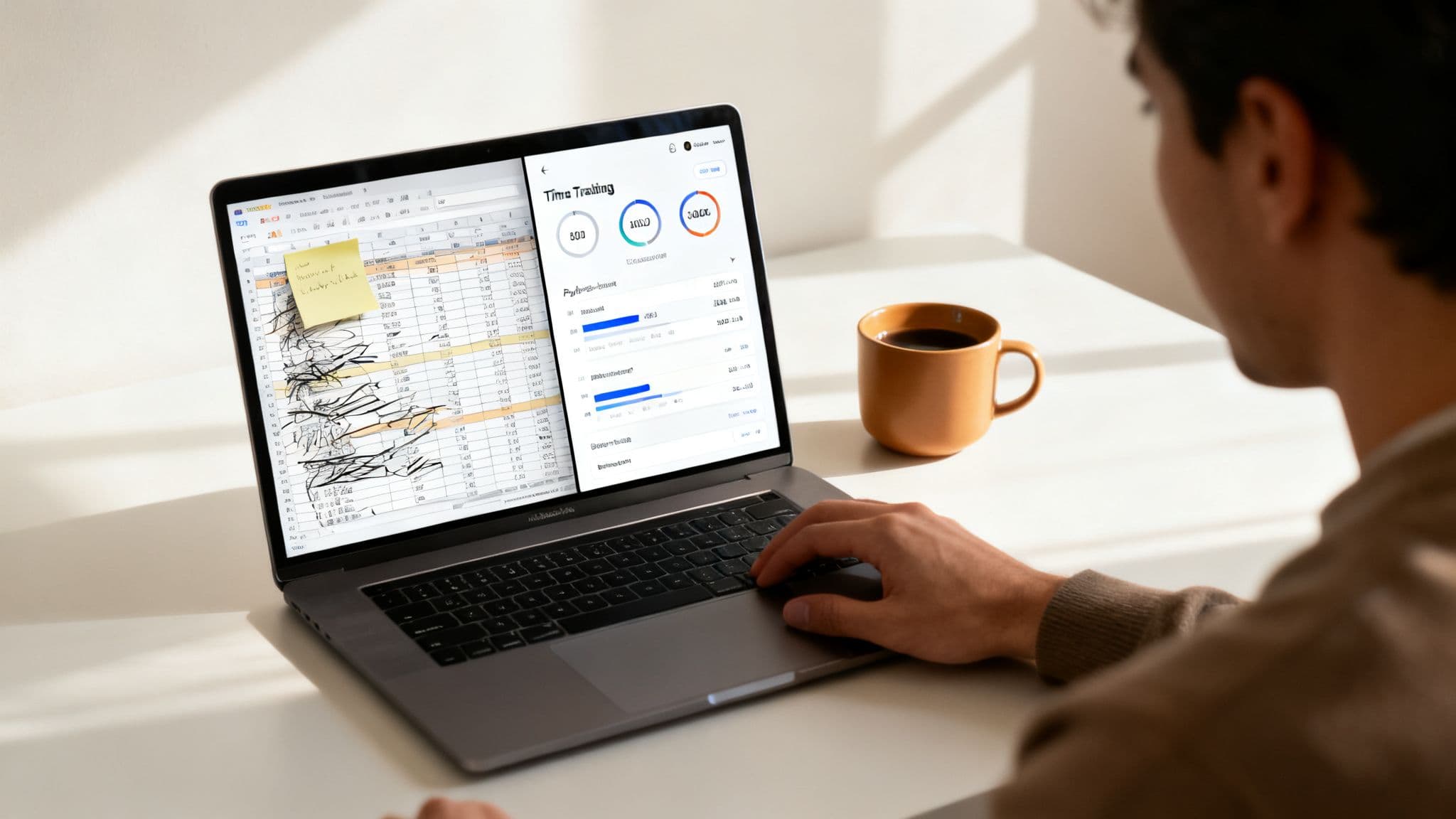
This is where the real-world difference between manual and automated tracking becomes so clear.
Manual Spreadsheets vs Automated Time Tracking
Here's a quick comparison showing the real-world impact of upgrading from a cobbled-together spreadsheet to an integrated system.
| Aspect | Manual Tracking (Spreadsheets/Notebooks) | Automated Tracking (Integrated Tools) |
|---|---|---|
| Accuracy | Prone to human error, forgotten entries, and guesstimates. | Captures time precisely, often down to the second, eliminating lost billable minutes. |
| Time Investment | Requires constant manual entry, updates, and corrections. It's a time sink. | Runs seamlessly in the background. Start a session and it does the work for you. |
| Client Reporting | A nightmare to compile. You have to manually create reports for invoices. | Generates professional, detailed reports with just a few clicks. |
| Business Insights | Provides almost zero insight into project profitability or personal capacity. | Reveals which clients are most profitable and where your time really goes. |
| Workflow Friction | Constantly interrupts your focus. "Did I start the timer? Did I log that call?" | Integrates directly into your workflow, becoming a natural part of getting work done. |
The takeaway is simple: manual tracking costs you more than just money—it costs you time, focus, and professional credibility.
A focus-first approach, like the one we've built into Locu, reframes the entire process. Instead of remembering to start and stop a timer, time is captured effortlessly as a natural byproduct of your deep work sessions. It’s designed to solve the most common freelance tracking challenges from the very start.
Ultimately, great time tracking is about valuing your own effort. It’s the foundation for pricing yourself correctly, getting fair compensation, and building a business that lasts. By adopting a system that captures your work seamlessly, you’re not just logging hours—you’re investing in the long-term health of your entire freelance career.
How to Choose a Time Tracking Method That Actually Works
Let's be real: the best time tracking tool is the one you actually use. There’s no magic bullet. The goal is to find a method that slots right into your existing workflow, not one that forces you to reinvent how you get things done.
It all starts with one simple question: do you prefer hands-on control or set-it-and-forget-it automation? For some freelancers, manually starting and stopping a timer is a focusing ritual. For others, it’s a jarring interruption that kills their flow. Neither is wrong—it’s about what works for you.
Manual vs. Automatic Time Capture
This isn't just about personal preference; it's about matching the tool to the rhythm of your work.
- Manual Entry: This gives you total control. It's perfect if you work in clean, predictable blocks. Think of a consultant who spends two solid hours on a client call—logging that manually is a piece of cake.
- Automatic Capture: This is a lifesaver for anyone whose day is fragmented. Picture a freelance developer jumping between writing code, reviewing a pull request, and hopping on a quick Slack huddle. An automatic tracker catches every billable minute in the background without them ever having to think about it.
The most effective systems often blend both. A tool like Locu, for instance, can capture your time automatically during a planned focus session but still lets you pop in and make manual adjustments later. You get the precision of automation with the flexibility of manual control.
Standalone App or an Integrated Workspace?
Next, you have to decide if a simple, dedicated time tracker is enough, or if you need something that does more. A standalone timer can work if all you're doing is logging hours. But if you’re juggling tasks, notes, and deadlines, an all-in-one workspace is infinitely more powerful.
Take a freelance designer. They get a huge advantage from a system where their project tasks, client feedback, and tracked time all live in one place. It makes invoicing a breeze and shows them exactly where their effort is going without having to switch between three different apps.
For remote professionals, this kind of unified system isn't just a nice-to-have; it's becoming a necessity. You can dive deeper into the specific needs of remote workers in our guide on time tracking for remote workers.
The demand for these smarter tools is exploding. The global time tracking software market is projected to hit $24.11 billion, largely because 36.2 million Americans are now working remotely. This shift highlights a massive need for flexible, cloud-based trackers that do more than just count the minutes. For freelancers, tools that merge time logs with project management are the key to eliminating that dreaded end-of-month scramble to figure out what you actually did. You can explore more market insights about these trends.
Building An Effortless Time Capture Habit
The best time tracking system is the one you forget you're even using. The secret isn't more discipline—it's building a habit so seamless that capturing your hours becomes a natural part of your workflow, not another chore to check off.
It all starts with a little bit of upfront organization. Before you track a single minute, get crystal clear on your projects and tasks. Draw a line in the sand between what's billable (client work, direct project tasks) and non-billable (your own marketing, admin, or skill development). Getting this sorted out first prevents a world of confusion down the line and keeps your reports clean from day one.
From Manual Timers to Guided Focus
We’ve all been there—constantly starting and stopping a timer is a notorious focus-killer. A much better way to work is to bake time capture directly into your work sessions. For instance, instead of toggling a manual timer on and off, you could use a tool like Locu to run guided focus sessions.
By pulling tasks directly from your project management tools, every block of work is already defined. When you kick off a focus session for a specific task, the time is logged automatically in the background. It's a small shift in process with a massive impact:
- No More Forgotten Timers: The clock is running as long as you're in a session. Simple as that.
- Zero Context Switching: You stay in your primary workspace instead of jumping back and forth to a separate timer app.
- Rich, Accurate Data: Every time entry is automatically tied to the right project and task, no questions asked.
This flowchart can help you figure out which style—manual, automatic, or integrated—is the right fit for the way you work.
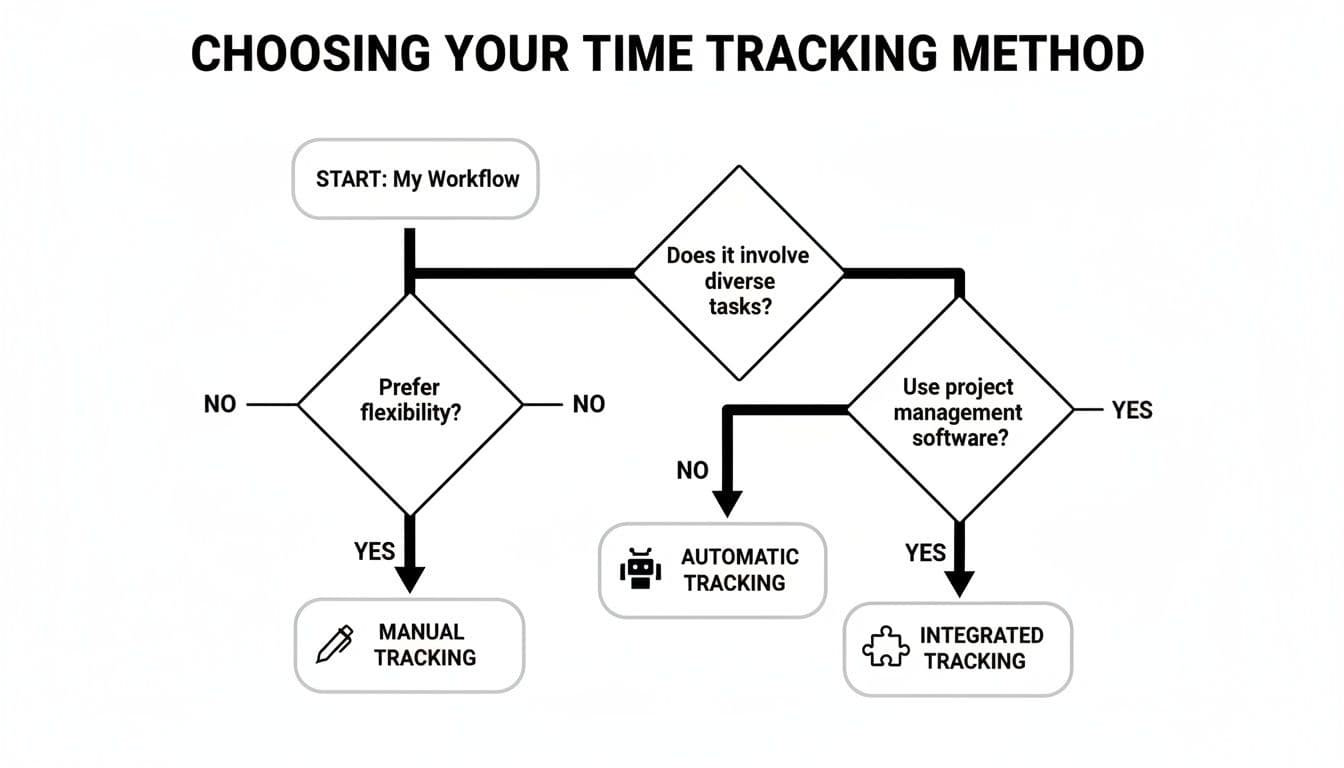
The big takeaway here is that an integrated approach gives you the best of both worlds, mixing the precision of automation with the structure of solid project management.
Rituals and Shortcuts That Make the Habit Stick
Creating an effortless habit is all about small, repeatable actions. One of the most powerful is a daily planning ritual. At the start of each day, take five minutes to map out your priorities and schedule your focus blocks. This proactive planning turns your day from a series of reactions into a deliberate, intentional workflow.
Another game-changer for staying in the zone is getting comfortable with keyboard shortcuts. The less you have to reach for your mouse to navigate between apps and timers, the less friction you introduce into your day. Find a tool that’s keyboard-friendly to slash those tiny disruptions and protect your creative flow. For freelancers looking into workflows that prioritize this kind of efficiency, you can see how different tools stack up in our guide on alternatives to other popular trackers.
The ultimate goal is to create a system that serves you, not the other way around. Your time tracking method should work silently in the background, delivering the precise data you need for billing and analysis without ever pulling you out of deep work.
When you integrate your task list directly with a focus timer, you create a unified workspace where planning, doing the work, and capturing the time all happen in one place. That cohesive environment is the secret to making time tracking for freelancers feel completely effortless.
Turning Tracked Hours Into Accurate Invoices
This is where all that meticulous time tracking really pays off. Let's be honest, logging hours is just the setup. The real win is turning that raw data into a professional invoice that gets you paid.
The bridge between tracking time and getting cash in the bank is built on clarity, detail, and transparency.
A great invoice does more than just ask for money. It tells the story of the value you delivered, justifying every line item and reinforcing the client’s brilliant decision to hire you in the first place. This is pretty much impossible if you're just pulling numbers from memory. Your time logs are your source of truth.
Setting Rates and Detailing Your Work
Not all work is created equal, right? You might charge a premium for high-level strategy sessions but have a standard rate for more routine implementation tasks. A flexible time tracking system lets you assign different billable rates to different projects—or even specific types of work within the same project.
When you send that invoice, you're not just showing a final number; you're providing proof of work. This is where the notes and context you captured alongside your time become incredibly valuable. Instead of a vague entry like "Website Updates - 5 hours," your invoice can tell the whole story, pulled directly from your time log:
- Implemented new user signup flow (2.5 hours)
- Debugged and resolved mobile navigation bug (1.5 hours)
- Client call to review progress and plan next sprint (1 hour)
This level of detail shuts down questions before they're even asked and builds a massive amount of trust. It transforms your invoice from a simple bill into a concise, powerful progress report.
From Raw Data to Polished Invoice
Okay, so you have all this beautiful, detailed time data. Now what? The final step is getting it into your invoicing software without losing your mind. Manually re-typing dozens of entries is not only a drag, but it's also a recipe for typos and errors.
This is exactly why a good export function is a non-negotiable feature. For instance, a tool like Locu lets you export a detailed CSV file of your time entries with a single click.
That file can be imported directly into almost any accounting or invoicing platform out there. All the crucial information—project name, task details, duration, and date—is transferred perfectly in seconds. This simple export-import workflow saves a ton of administrative headache and ensures 100% accuracy from your tracker to your final invoice. For more strategies on this, check out our detailed guide on the best ways to track your billable hours.
Time tracking also shines a light on how you really spend your day. One study found that the average freelancer spends just 2 hours and 53 minutes on high-value, billable tasks. A staggering 51% of their day gets eaten up by low-value activities. By creating visual reports from your tracked time, you gain the insights needed to optimize your schedule and reclaim that lost productivity. Discover more about how digital tracking boosts freelancer efficiency on Upwork.com.
At the end of the day, a seamless invoicing process powered by precise time tracking helps you get paid faster and more reliably. It closes the loop on your freelance workflow, ensuring your hard work is always rewarded accurately and without the hassle.
Using Your Data To Increase Freelance Profitability
Great time tracking isn't just for sending invoices—it’s your personal business intelligence tool. Once you start consistently capturing where your hours go, you unlock a treasure trove of data. This information is the key to making smarter, more strategic decisions that directly boost your bottom line.

Think of your time logs as a financial health report for your freelance business. By regularly reviewing this data, you move from reacting to problems to proactively shaping your business for success. It’s the difference between working in your business and working on it.
Identify Your Most Profitable Work
The first and most powerful analysis is figuring out which clients and projects actually make you the most money. Run a report for the last quarter and just look at the numbers. You might be shocked by what you find.
That "easy" client who always pays on time might actually be your least profitable once you account for the endless small revisions and "quick check-in" calls. Meanwhile, that challenging but well-defined project you dreaded might be a goldmine. Your data tells the real story, not your gut feelings.
- Client Profitability: Which clients give you the highest effective hourly rate? Look at the total hours logged versus the total revenue for each one.
- Project Type Analysis: Are you earning more per hour on design work or development tasks? Is strategy consulting more lucrative than implementation?
- Service Offering Refinement: Use these insights to aim your marketing efforts squarely at attracting more of your ideal, high-value projects.
This data-driven approach gives you the confidence to adjust your rates, prioritize certain types of work, and even fire clients who are no longer a good fit for your financial goals.
Spot Scope Creep and Craft Better Estimates
Scope creep is the silent killer of freelance profitability. It starts with a small, "quick question" that turns into an hour of unbilled work, and then another, and another. Your time tracking data is your best defense.
By reviewing your time logs weekly, you can see exactly when a project is starting to balloon past its initial estimate. When you notice hours creeping up on a specific task, you can address it with the client immediately, armed with undeniable proof.
This isn't about being rigid; it's about being professional. Presenting a client with a report showing that "Phase 1" has taken 25 hours instead of the estimated 15 opens a productive conversation about adjusting the project scope or budget.
Better yet, this historical data is pure gold for crafting future proposals. Instead of guessing how long a "five-page website build" will take, you can look at the actual time it took you on three similar projects. This lets you create incredibly accurate estimates, protecting your time and building trust with new clients right from the start.
Using a tool like Locu, you can easily filter and review your time by day, week, or project to understand these productivity patterns and build a more resilient business.
Look, even the most disciplined freelancers run into trouble with time tracking. You can have the best intentions and the perfect app, but small, everyday annoyances can make the whole process feel like a chore you'd rather skip. Let's get real about the most common headaches and how to solve them.
The biggest one? Just flat-out forgetting to start or stop the timer. You get locked into a state of flow, solving a tricky problem for a client, and the last thing on your mind is clicking a button. Two hours later, you surface for air and realize none of that focused work was logged. Ugh.
This constant need to "remember to track" is a focus-killer. It pulls you out of the very work you're trying to bill for. Instead of trying to force a habit that works against your natural workflow, it’s better to find a system that makes tracking feel invisible.
Solving the "Forgot to Hit Start" Problem
A much smarter way to work is to use a system where time tracking is just a natural part of your planned workflow, not a separate task you have to remember. For instance, with a tool like Locu, you’re already defining your focus sessions for specific tasks before you start. When it's time to work, the time is captured automatically in the background. No more manual start/stop nagging at you.
Then there's the other classic frustration: logging all those tiny, scattered tasks. How are you supposed to track the five minutes you spent firing off a client email? Or that ten-minute Slack conversation that was definitely billable advice? These little bits and pieces can easily add up to hours of lost income over a month.
The answer is to stop tracking a million tiny things and start batching your tasks. Instead of logging every little interaction, group similar activities into a single, dedicated block. For example, carve out a 30-minute "Client Comms" block twice a day to knock out all your emails and messages in one go.
This little trick does more than just simplify your time tracking for freelancers; it also protects your focus by keeping you from constantly switching gears. When you solve these small but persistent frustrations, you finally build a tracking habit that sticks. You capture every billable minute without wrecking your productivity in the process.
Answering Your Time Tracking Questions
It's natural to have a few questions when you're dialing in your time tracking system. Let's tackle some of the most common ones I hear from other freelancers.
How Detailed Do My Time Entries Need to Be?
Think of it this way: your time entries should be clear enough that both you and your client can instantly grasp the value you delivered.
Instead of a vague entry like "Website work," get specific. Try something like, "Implemented user authentication flow for the new checkout page." That level of detail is gold for transparent invoicing and helps you remember exactly what you were working on weeks later when it's time to build reports.
Is It Really Worth Tracking Non-Billable Hours?
Yes. One hundred percent.
Tracking the time you spend on marketing, admin, and writing proposals isn't about micromanaging yourself. It’s about uncovering your true hourly rate and seeing the total effort it takes to run your freelance business.
This data shows you exactly how much time you're investing in your own growth. It's essential information for setting profitable rates that cover all your work, not just the hours spent directly on client projects.
How Can I Make Time Tracking Feel Less Like a Chore?
The secret is to make it disappear into your workflow. If you have to constantly remember to start and stop a timer, you'll eventually stop doing it. The key is to find a tool that works in the background or automates the process as much as possible.
This is where a system like Locu completely changes the game. Time is captured automatically as a byproduct of your planned focus sessions. It stops being an extra task you have to manage and simply becomes part of how you do your best work.
Ready to turn time tracking from a chore into a strategic advantage? Locu combines tasks, notes, and a focus timer to capture your work effortlessly, so you can focus on what matters most. Start your free 10-day trial of Locu today.
Stop Losing Billable Minutes—Track Effortlessly
Join freelancers who capture every billable minute and invoice with confidence.