Mastering Time Tracking for Remote Workers
Let's be honest: in a remote setup, just because someone is online doesn't mean they're being productive. Effective time tracking for remote workers isn't about watching over shoulders. It’s a tool for clarity, focus, and building a culture of trust by measuring what really matters: output.
Why Time Tracking Is Essential for Remote Teams

Trying to manage a remote team without solid data is like captaining a ship without a compass. You see plenty of activity—Slack channels buzzing, calendars packed with meetings—but you're basically sailing blind. Are you actually moving toward your destination? This is exactly where time tracking makes a difference, pulling the focus away from the illusion of busyness and toward tangible progress.
A Tool for Clarity Not Control
The biggest misconception about time tracking is that it’s a surveillance tool. It's time to change that narrative. When done right, it's not about control; it's a shared resource that brings objective clarity to a work environment that can often feel disconnected.
For team members, it’s a powerful shield. It helps them protect their focus time from endless pings and interruptions. It also provides clear, undeniable proof of their contributions, which is crucial for fair compensation, performance reviews, and getting the recognition they deserve.
For managers, it’s a strategic dashboard. It offers a real-world look at team capacity, helps spot the early signs of burnout, and makes project forecasting far more accurate. This data-driven insight takes the guesswork out of performance conversations. For more ideas on steering a distributed team, these remote team management tips are a great resource.
The Financial and Human Cost of Unmeasured Time
With hybrid work becoming the norm, the need for better systems is undeniable. The number of Americans working from home is set to hit 36.2 million by 2025. Without a clear view of how time is spent, the costs—both financial and human—are massive.
Wasted time costs the US economy an estimated $588 billion every year, with the average worker only being truly productive for just under three hours a day. By turning those unmeasured hours into useful data, teams can get their focus back and start driving real results. To get a head start, check out our guide on work-from-home productivity tips.
Choosing Your Time Tracking Philosophy
Before you start looking at tools, you need to step back and ask a more fundamental question: what are we actually trying to measure? Time tracking isn't a one-size-fits-all problem, especially for remote teams. Your approach says a lot about your company's culture and what you value most.
Ultimately, there are two main schools of thought. The one you choose will shape everything from the data you collect to the conversations you have with your team about performance.
The Quantitative Approach: Activity Tracking
Think of activity tracking like keeping a detailed financial ledger, but for time. It's all about the input. The central question is simple and direct: how many hours did we spend on this task, this project, or for this client?
This model is a lifesaver in businesses where time is literally money. It’s the go-to for:
-
Agencies and Freelancers: You can't bill clients accurately or transparently without it.
-
Hourly Teams: It's essential for running payroll correctly and staying compliant.
-
Resource Planning: It gives managers a clear view of who’s swamped and who has bandwidth, preventing bottlenecks before they happen.
The goal here is to build a factual, data-rich record of where effort is going. It answers questions like, "Did we blow the time budget on that new feature?" or "Is our team spending more time in meetings than in deep work?" It provides a clean, numerical baseline for efficiency.
The Qualitative Approach: Outcome Tracking
On the other side of the coin, you have outcome tracking. This philosophy cares less about the minutes and hours and a whole lot more about the final result. Instead of measuring input, it measures output.
Outcome tracking fundamentally changes the conversation from "How long did you work?" to "What did you accomplish?" This approach is built on trust, giving your team the autonomy to manage their own schedule as long as they deliver great work on time.
This model is a natural fit for roles where creativity and deep thinking are the real drivers of value. You'll often see it in:
-
Product and Engineering Teams: Success is measured by shipped features and squashed bugs, not hours logged.
-
Creative Roles: A designer might crack a tough branding problem in a two-hour burst of inspiration. The timesheet would completely miss the value of that breakthrough.
-
Senior or Salaried Positions: You're paying for expertise and impact, not just for someone to be at their desk.
By focusing on goals and deliverables, outcome tracking is a perfect match for agile teams and results-driven cultures. The ultimate measure of a good week isn't a full timesheet—it's a finished project and a happy customer.
Activity Tracking vs. Outcome Tracking: A Comparison
So, which model is right for you? It really depends on your team's structure, goals, and culture. This table breaks down the key differences to help you see where you might land.
| Aspect | Activity Tracking | Outcome Tracking |
|---|---|---|
| Primary Focus | Measures input (hours worked) | Measures output (results achieved) |
| Core Question | "How much time was spent?" | "What was accomplished?" |
| Best For | Billing, payroll, resource allocation | Goal-oriented, agile, creative work |
| Culture Fit | Works well with structured workflows | Thrives in high-trust, autonomous environments |
| Potential Pitfall | Can feel like micromanagement if not handled well | Can lack data for forecasting & planning |
| Example Metric | 40 hours logged against Project X | 3 key features shipped in a sprint |
While one approach might seem like a better fit on the surface, the reality for most modern teams is that you need a little bit of both.
Finding the Best of Both Worlds: A Hybrid Model
For many forward-thinking remote teams, the smartest path isn't a hard choice between the two. It's about blending them. A system that only tracks activity can feel like big brother is watching, while one that only tracks outcomes can leave you guessing when it's time to plan the next project.
A hybrid model connects the "how long" with the "what for."
This is where the right tool can make all the difference. For example, Locu's focus sessions automatically capture the time someone spends on a task (the activity) and then link that time directly to a specific ticket in Jira or Linear (the outcome). This creates a seamless, low-friction bridge between effort and results. Your team gets a perfect record of their work without the soul-crushing admin of manual timesheets, and managers get incredibly powerful insights.
With this hybrid view, you can start answering much more interesting questions. "How many hours of focused work did it actually take to deliver our last sprint?" or "Is the time we're pouring into this initiative giving us the returns we expected?" You get the hard data from activity tracking, but with the meaningful context of outcome tracking. It’s the whole story.
Understanding Passive Versus Manual Time Tracking
Once you’ve settled on what you’re measuring—be it raw activity or tangible outcomes—the next question is how. When it comes to the actual mechanics of tracking time for a remote team, you’re looking at two main camps. Each has a completely different feel and impact on the daily workflow.
Making this choice isn't just about picking software. It's about finding a method that clicks with your team's culture, work style, and just how much administrative overhead everyone can tolerate.
The Deliberate Method: Manual Time Tracking
Manual time tracking is the old-school approach. Think of it as hitting start and stop on a stopwatch. This method demands active involvement; team members have to remember to start a timer, pause it for breaks, and stop it when they're done. Or, they might fill out a timesheet at the end of the day.
There's a certain mindfulness to this. When you physically click "start" on a task, you're making a conscious decision to focus. But this strength is also its biggest flaw—it’s completely dependent on human discipline and a good memory. According to the American Payroll Association, time theft impacts about 75% of businesses, and a lot of that comes from innocent mistakes like rounding up hours or forgetting to clock out for lunch.
Common ways to track manually include:
-
Start/Stop Timers: Clicking a button in an app to begin and end a work session.
-
Digital Timesheets: Typing hours worked into a spreadsheet or software.
-
Project-Based Logging: Guessing how much time was spent on different tasks after the fact.
It’s simple, but the risk of forgotten timers and fuzzy data is huge. One missed entry can throw off an entire day’s worth of data, leading to a lot of frustrating guesswork and reports you can't really trust.
The Effortless Approach: Passive Time Tracking
On the flip side, passive time tracking works quietly in the background, capturing activity automatically without you having to do a thing. It’s kind of like a smart home that learns your patterns. Instead of you telling it what you're doing, it observes your digital footprint and builds a record for you.
This is where the philosophy of what you’re tracking really comes into play. Are you measuring the effort or the end result?
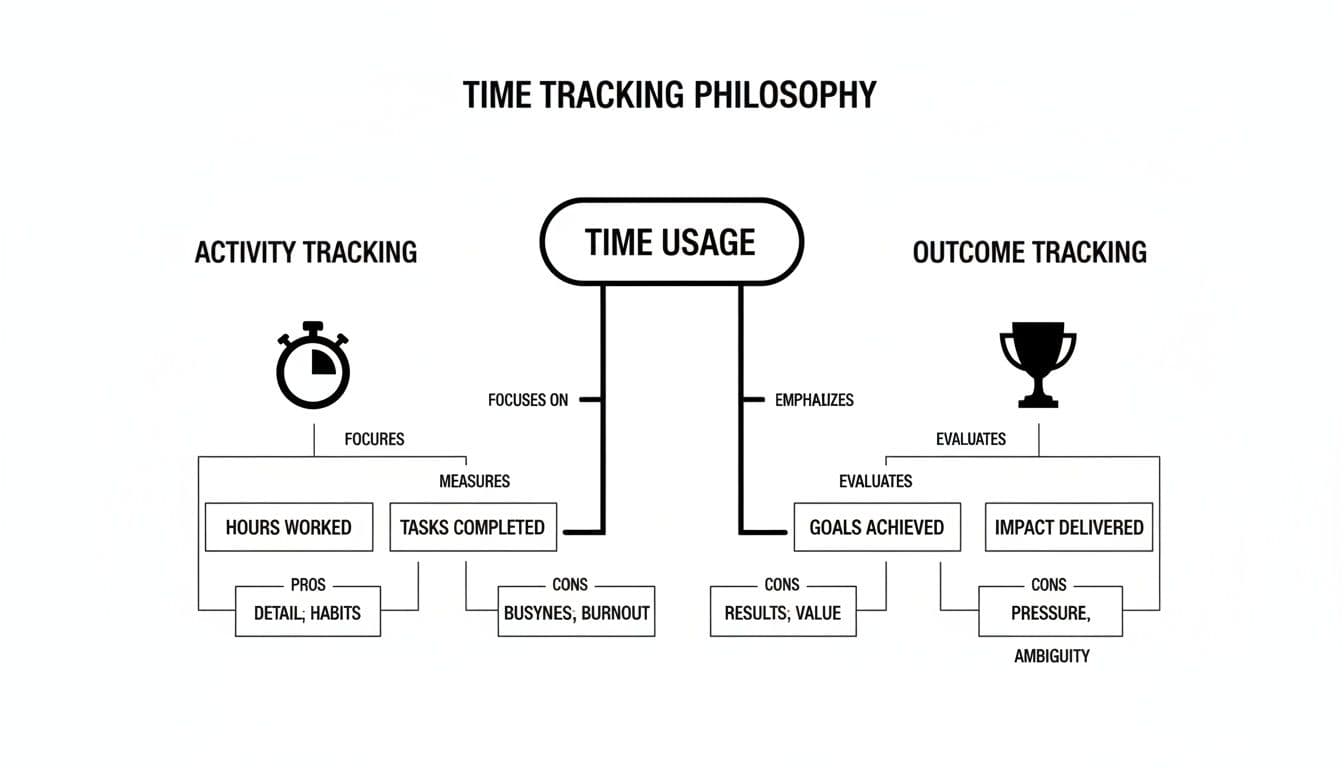
As the diagram shows, activity tracking is about the process (the stopwatch), while outcome tracking is about the result (the trophy). Both manual and passive methods can be bent to serve either philosophy.
Passive systems usually work by noting which apps and websites you use, then automatically sorting them into "productive" or "distracting" categories. This creates a precise, gap-free timeline of the workday and cuts out the human error you get with manual entry. The data is objective and complete, giving you a real, unfiltered look at where the hours are actually going. If you're tired of manual timers, exploring tools built for automatic capture, like some covered in this RescueTime alternative analysis, can be a real eye-opener.
Addressing the Elephant in the Room: Privacy
Let's be honest: the idea of "automatic tracking" can sound a bit creepy. It immediately brings up fears of "bossware" that logs keystrokes or snaps random screenshots. And those concerns are completely valid.
But ethical passive time tracking is a different beast entirely.
The goal of a well-designed passive tracking system is to create a reliable work history that builds trust, not to monitor every click. It focuses on application usage and document titles to understand work context, not on invasive surveillance.
Good tools are built with privacy as a cornerstone, not an afterthought. They put the user in the driver's seat by:
-
Giving Full Control: Team members can see, edit, and even delete their own data. Nothing is secret.
-
Avoiding Invasive Methods: No keyloggers, no random screen grabs, and no camera monitoring. Ever.
-
Focusing on Work Context: The data is about which app was used for which project, not what you typed in that Slack message.
This approach flips the script, turning tracking from a top-down mandate into a personal productivity tool. It gives teams accurate, effortless data they can use to protect their focus time and spot workflow bottlenecks—all without feeling like Big Brother is watching. By automating the grunt work, everyone can spend less time filling out timesheets and more time doing the work that matters.
Building a Culture of Trust Around Time Tracking
Let’s be honest: introducing time tracking can feel like walking a tightrope. On one side, you have the business need for clear data to make smart decisions. On the other, you have your team's very real fear of being spied on, which can tank morale if you're not careful.
The line between a tool that empowers your team and one that just makes them feel watched all day comes down to one thing: trust. When you position time tracking as a shared resource instead of a top-down mandate, it stops being a source of anxiety and becomes a tool everyone can use to succeed.
Frame It as a Tool for Improvement, Not Inspection
The words "time tracking" often bring up images of creepy "bossware" that counts every keystroke. To get past that, you have to be completely transparent about the why before you even get to the how.
Start by connecting the initiative to goals that actually benefit your team. Make it crystal clear that the data isn't about watching individuals—it's about understanding how the team works as a whole. When you explain it this way, your team will see it’s a tool for:
-
Protecting Deep Work: Finally getting a handle on how many meetings and pings are derailing focus.
-
Justifying More Resources: Using real data to prove the team is overloaded and needs another hire.
-
Balancing Workloads: Spotting who’s consistently burning the midnight oil and redistributing tasks to prevent burnout.
When people see the data being used to make their work lives better, the fear of being watched is replaced by the feeling of being supported. It's critical to measure team productivity without resorting to micromanaging and keep that trust front and center.
From Big Brother to a Better Workflow
The real trick is to shift the conversation from individual performance to collective insight. Don't let managers hoard the data. Instead, share high-level, anonymized reports with everyone. Celebrate wins together, like when the team’s total focus hours go up or you successfully cut down on administrative busywork.
Time tracking data shouldn't be a secret report card for managers. It should be a shared dashboard that helps the entire team navigate toward a more sustainable and productive way of working together.
This creates a positive feedback loop where everyone feels invested in improving how the team operates. It proves the goal isn't to catch people slacking off, but to clear the roadblocks that get in the way of great work.
Using Data to Solve Real Problems
This approach really shines when you use the data to tackle tangible issues. For example, a 2026 study that analyzed over 481,000 tracked hours revealed a huge challenge for remote teams: workers spend just 51% of their day on deep, focused work.
Where does the rest of the time go? A whopping 49% is eaten up by communication (34%) and meetings (15%). For every hour of productive work, almost another full hour is lost to coordination. You can dig into more insights from the full WebWork study on remote work productivity.
Armed with that kind of data, a manager can start a completely different conversation. Instead of saying, "You need to be more productive," they can say, "Hey team, the data shows we're losing nearly half our day to meetings and chat. What are some ideas for protecting our focus time?"
See the difference? The data becomes an ally. It’s the objective evidence you need to justify changes like "no-meeting Wednesdays" or new rules for using Slack. The tool transforms into a catalyst for positive change, proving its value to even the biggest skeptics on your team. Building trust, in the end, is all about showing them you’re on their side, and you have the data to back it up.
Measuring What Matters for Remote Team Success
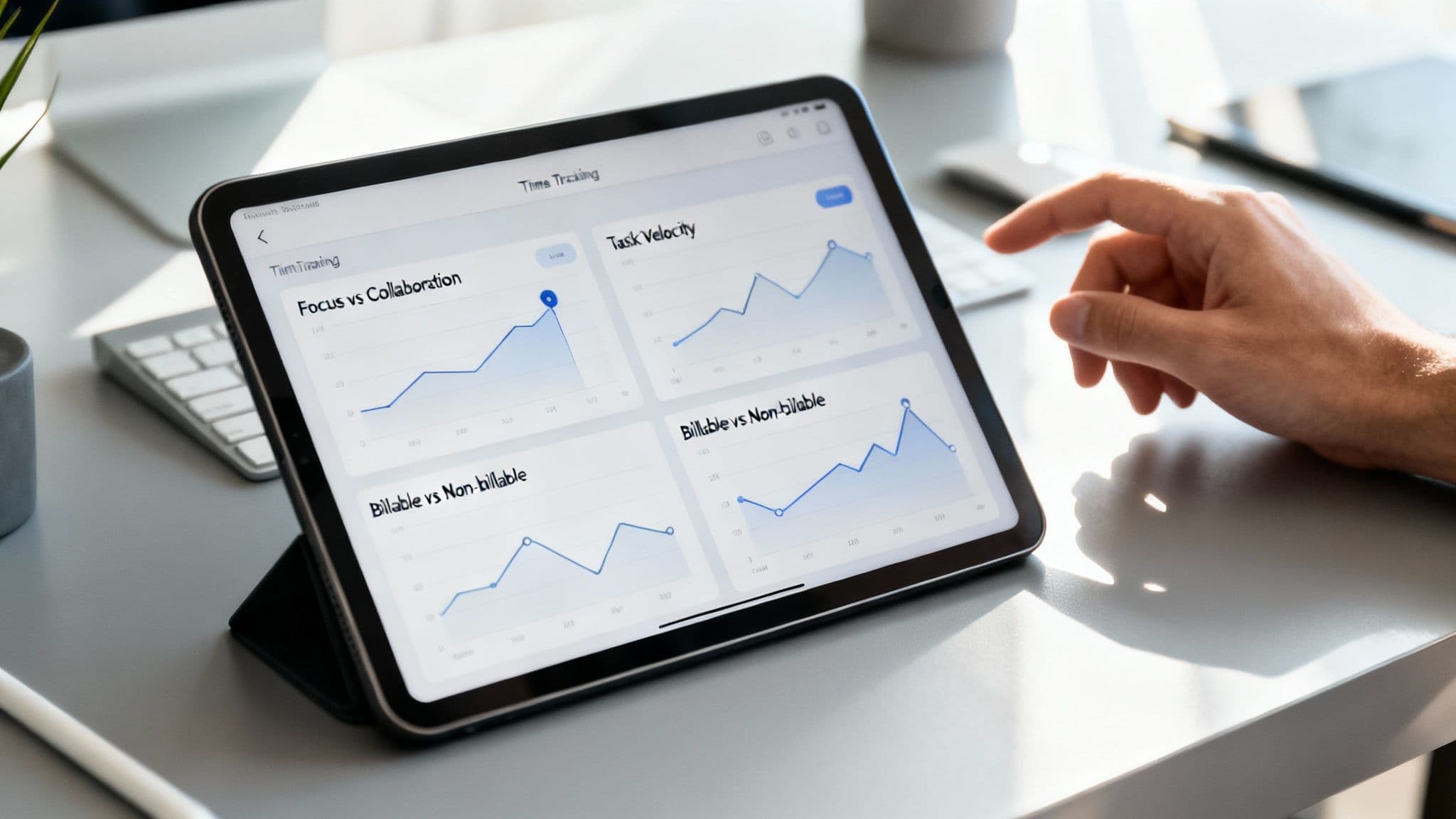
Effective time tracking for remote workers isn't just about logging hours. Treating a timesheet like a simple punch card is like owning a high-performance car and only using it to drive to the mailbox. You're missing the point entirely. The real power comes from turning that raw time data into a clear picture of your team's health, efficiency, and overall performance.
To get there, you have to look beyond the total number of hours worked and start asking about the quality and context of that time. By focusing on the right key performance indicators (KPIs), you can turn time tracking from a boring administrative task into a strategic tool for making smarter decisions. It’s the difference between knowing your team worked 40 hours and knowing precisely how those 40 hours created value.
This shift in thinking lets you spot trends before they become problems, rebalance lopsided workloads, and sharpen your project estimates with real confidence. It gives your remote team a serious edge.
Focus Time Versus Collaboration Time
One of the most eye-opening metrics you can track is the ratio of focus time to collaboration time. Focus time is that sacred, uninterrupted deep work where complex problems get solved and real progress happens. Collaboration time, on the other hand, covers everything from meetings and Slack conversations to emails—all essential for coordination, but often a massive productivity killer.
A healthy balance is everything. Too much collaboration time, and you get meeting fatigue and constant context-switching. Too little, and people start working in silos, leading to misalignment down the road. Analyzing this ratio helps you answer some critical questions:
-
Are back-to-back meetings keeping your engineers from actually writing code?
-
Is "asynchronous communication" just a nice way of saying "endless Slack notifications"?
-
Does the team have enough protected time to get into a state of flow?
If you find out your team is spending 60% of its day in meetings and chat, you suddenly have a data-backed reason to introduce things like "no-meeting Wednesdays" or set stricter communication rules. This one metric can be a powerful lever for cutting down on burnout and boosting meaningful output.
Understanding Task Completion Velocity
Another vital KPI is task completion velocity, which is really just a measure of how long it takes for a task to get from "in progress" to "done." This isn't about cracking the whip to make people work faster; it’s about finding the hidden friction in your workflow. A slow velocity might mean tasks are poorly defined, team members are blocked and don't know who to ask for help, or your review process is a bottleneck.
By tracking how long specific types of tasks take, you move from guesswork to data-driven forecasting. You can create more accurate project timelines and manage client expectations with real-world evidence.
Imagine you're building a new software feature. Time tracking data that’s automatically synced with your project management tool can show you that bug fixes take an average of two hours, while new feature development takes closer to 18 hours. With Locu’s automatic time capture and two-way sync for Jira and Linear, this data gets gathered without anyone having to lift a finger. That kind of information is gold for sprint planning and resource allocation.
Tracking Billable and Non-Billable Hours
For any agency, consultant, or freelancer, the line between billable and non-billable hours is the lifeblood of the business. Getting this right is obviously crucial for profitability, but it also uncovers some deeper operational truths.
-
Billable Hours: This is the time spent directly on client projects. Tracking it ensures you’re invoicing correctly and clearly demonstrating value.
-
Non-Billable Hours: This bucket includes all the other stuff—admin tasks, internal meetings, business development, and training.
When your non-billable time starts creeping up, it’s a red flag for inefficiency. Are you spending way too much time on proposals that don't convert? Are internal processes so clunky that they're eating into valuable client time? Analyzing this data helps you streamline your operations, price your services more accurately, and make sure your team is focused on what actually generates revenue. It turns time tracking into a direct tool for improving your bottom line.
How to Implement a Time Tracking System
Rolling out a time tracking system isn't as simple as just buying some software and telling everyone to use it. If you want it to actually work—and not become another ignored administrative headache—you need a thoughtful, phased approach. Rushing the process is a surefire way to meet resistance and confusion.
A clear, step-by-step plan makes the transition smooth for everyone involved. I've broken the process down into five manageable stages to help you roll out a solution that your remote team will understand and even appreciate.
1. Define Your Goals First
Before you even think about looking at tools, you need to answer one fundamental question: Why are we doing this? Your answer will shape every other decision you make. Without a clear "why," you're just collecting a mountain of data with no purpose.
Are you trying to bill clients more accurately? Maybe you need to get a better handle on project budgets and stop scope creep in its tracks. Or perhaps the goal is to protect your team from burnout by finally getting visibility into who's overloaded.
Your objectives should be specific. For example:
-
Improve Project Profitability: Pinpoint which projects are bleeding money and figure out why.
-
Balance Team Workloads: Use hard data to see who is consistently overworked and reallocate tasks fairly.
-
Enhance Forecast Accuracy: Base future project estimates on real historical data, not just guesswork.
2. Choose the Right Tool for Your Team
Once you have your "why," you can start looking for the "how." The best tool isn't the one with a million features; it's the one that fits your company culture and plugs right into your team's existing workflow. The goal is to find something people will actually use.
Think about how your team operates day-to-day. If your engineers live and breathe in platforms like Jira or Linear, then a tool with a deep, two-way sync is a must-have. We actually wrote a whole guide on effective Linear time tracking that digs into this. A tool like Locu, which automatically captures time and ties it back to specific tasks, removes the manual drudgery that everyone hates.
The real objective isn't just to track time; it's to gather data with the least amount of friction possible. The more automated and integrated the tool, the higher the chances your team will adopt it.
3. Communicate the Benefits Clearly
This is probably the most crucial step for getting your team on board. You have to tackle the "what's in it for me?" question head-on. Don't let them think this is a new surveillance tactic. Instead, frame it as a tool that empowers them.
Be transparent. Explain exactly how the data will be used to their benefit—to justify hiring more help, to protect their deep work time from being eaten up by meetings, and to ensure work is distributed fairly. When your team understands the system is there to support them, not to micromanage them, you'll see cooperation instead of resistance.
4. Run a Small Pilot Program
Whatever you do, don't roll out a new system to the entire company all at once. Start with a small, enthusiastic pilot group. This gives you a safe space to test the tool and your process, work out the kinks, and get honest feedback before a company-wide launch.
The pilot program will help you spot problems you never anticipated. Maybe the setup is a bit clunky, or the reports aren't pulling the right data. Your pilot group will not only help you fix these issues but also become your biggest advocates, ready to help their colleagues when it's time to expand.
5. Schedule Regular Reviews and Iterate
Time tracking isn't a "set it and forget it" initiative. It needs to evolve with your team and your business. The best way to ensure it stays relevant is to schedule regular check-ins—maybe quarterly—to review both the data and the process itself.
During these reviews, ask some key questions:
-
Are we actually meeting the goals we set out to achieve?
-
Is the data showing us any surprising trends in our workflow?
-
What is the team saying? What's working and what's frustrating?
Use these insights to tweak your strategy. You might find you need to track different metrics or adjust a team's workflow based on what the numbers are telling you. This cycle of continuous improvement is what keeps a time tracking system a valuable asset instead of a stale requirement.
Common Questions About Remote Time Tracking
When you start looking into time tracking for a remote team, a few big questions always come up. It's natural to wonder about the legal side of things, how it affects your team's morale, and how to get everyone on board. Let’s tackle these head-on.
Is It Legal to Track Time for Remote Employees?
In short, yes. For the most part, it's perfectly legal for companies to track remote employees' time for legitimate business needs, like running payroll or managing project budgets.
The important thing to remember is that privacy laws can differ quite a bit depending on where you and your team are located. The golden rule is transparency. A clear, written policy that explains what you're tracking and why is non-negotiable. This builds trust and keeps you compliant. The best approach is to use tools that focus on work, not on watching people's screens.
How Can Time Tracking Actually Prevent Team Burnout?
This might seem counterintuitive, but good time tracking data can be your best defense against burnout. Think of it as an early-warning system. When you can see who's consistently working late or juggling a massive workload, you can step in before they hit a wall.
This kind of objective data gives you a starting point for real, supportive conversations. You can talk about shifting priorities, sharing the load, or protecting time for focused work. It makes an invisible problem visible, allowing you to proactively support your team's well-being.
What's the Best Way to Get My Team on Board?
Getting buy-in is all about framing. Position time tracking as a tool that helps them first and foremost. Show them how it can protect their deep work time, highlight when they're overloaded, and create a clear record of all their hard work.
Bring your team into the conversation when you're choosing a tool. Run a small pilot test with a few volunteers and use their feedback to smooth out the rough edges. When people understand that it’s there to make their own work lives better, not to micromanage them, they’re much more likely to embrace it.
Ready to build a culture of focus and trust? Locu combines automatic time tracking with a powerful to-do list and focus timer, giving your team the tools to do their best work without the administrative overhead. Start your free 10-day trial and see the difference.
Make remote time measurable, not just visible
Join remote engineers who measure time and ship consistent results.