Best Time Tracking for Linear in 2025 (Focus Timer + Private Notes)
Linear is fast, minimal, and built for engineering teams. But one thing it explicitly doesn't include? Time tracking.
That's a deliberate choice—Linear focuses on project management, not personal execution. But if you're a freelancer billing clients, an IC tracking focus time, or just want to know where your hours actually go, you need something more.
Most people bolt on Toggl or Clockify and deal with constant timer toggling. There's a better way: Locu integrates directly with Linear to give you focus sessions, automatic time tracking per issue, and private notes—all in one flow.
Locu is available in the official Linear integrations directory.
Why Linear Doesn't Have Time Tracking
Linear's philosophy is clear: fast issue tracking for teams. They deliberately avoid feature bloat.
From their community discussions, the Linear team has said time tracking isn't on their roadmap because:
- It slows down the interface
- Team-level time tracking often becomes surveillance
- It's outside their core scope of issue management
Fair enough. But that leaves individual contributors without a clean solution for:
- Freelancers who bill hourly and need accurate time per issue
- Engineers who want to measure deep work time vs. shallow work
- Anyone who wants to see "how long did that feature actually take?"
The Problem With Toggl + Linear
The default solution is running Toggl (or Clockify/Harvest) alongside Linear. Here's what that looks like:
- Open Linear, find your issue
- Open Toggl, create entry, link to project
- Start timer
- Work on issue
- Forget you're tracking → timer runs through lunch
- Remember to stop timer
- Manually reconcile at month end
The friction compounds. You're maintaining two systems, constantly context-switching between them, and still ending up with inaccurate data.
How Locu Solves Linear Time Tracking
Locu takes a different approach: instead of "tracking time," you work in focused sessions where time tracking happens automatically.
1. Import Linear Issues Directly
Connect your Linear workspace and import issues assigned to you—or from your current cycle. Issues sync in real-time, so status changes in Linear appear instantly in Locu.
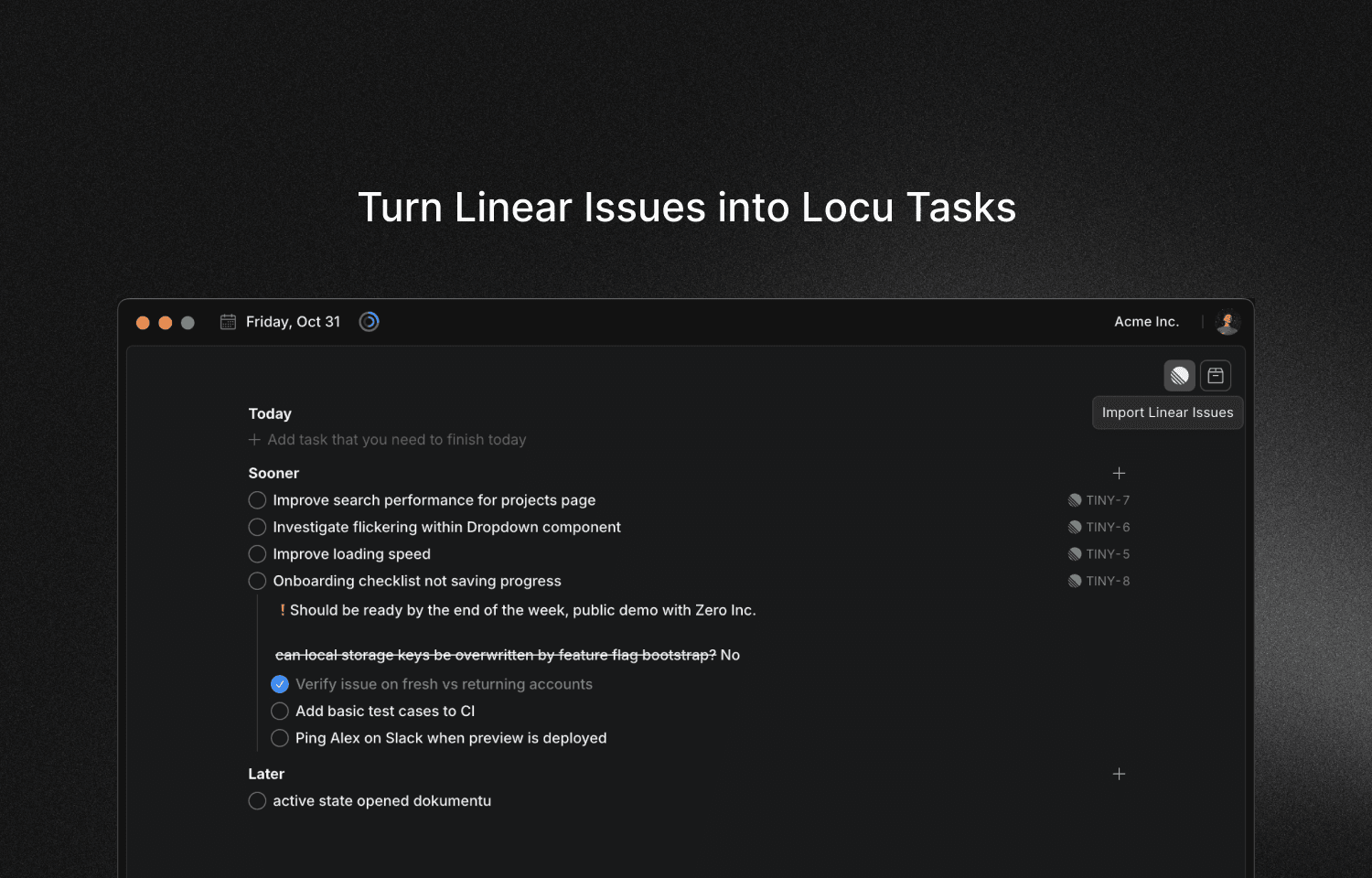
2. Work in Focus Sessions With Full Context
Start a 90-minute focus session, select your Linear issue, and get to work. While you're in the session:
- Time is tracked automatically to that specific issue
- Full issue details visible (status, priority, description)
- Your private notes alongside the Linear description
- Task breakdown for complex issues
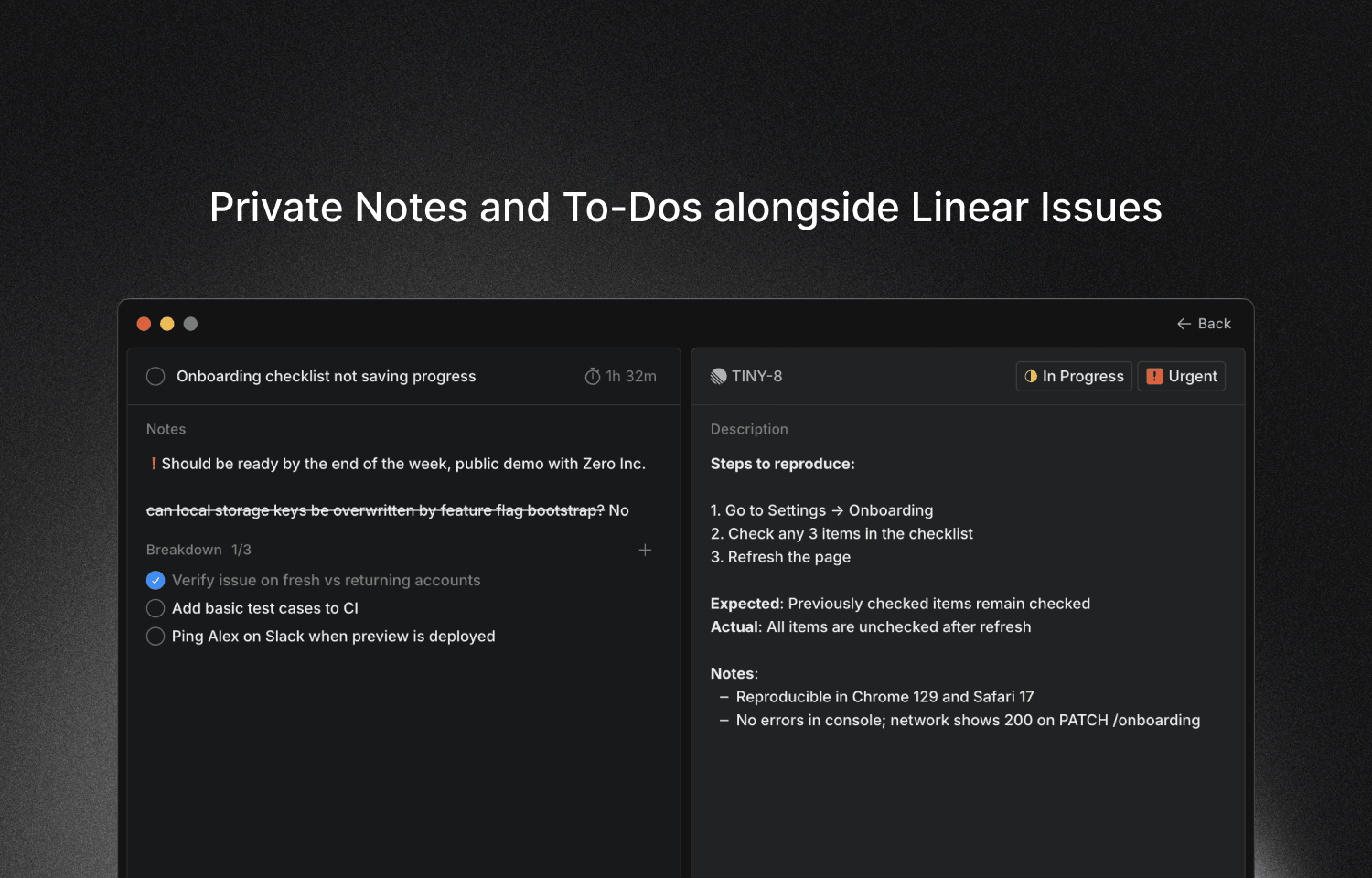
3. Switch Issues Without Breaking Flow
Working on multiple issues? Just switch tasks within your session. Time follows automatically—no manual timer juggling.
4. See Exactly Where Time Went
At day's end (or month's end for invoicing), you have accurate time per Linear issue. Export to CSV for billing, or just review your focused vs. unfocused ratio.
What Makes This Different From Other Linear Integrations
vs. Toggl + Linear
| Feature | Toggl + Linear | Locu |
|---|---|---|
| Time tracking | Manual start/stop | Automatic during sessions |
| Task context | Separate windows | Everything in one view |
| Private notes | Not connected | Linked to issue |
| Focus structure | None | 90-min brain-optimal sessions |
| Setup friction | High | Import and go |
vs. Linear's Built-in Features
Linear has cycle time metrics and project insights—useful for team planning. But they don't show:
- How long you spent on a specific issue
- Your focused work time vs. scattered time
- Personal notes and breakdown that don't belong in the team workspace
Locu fills this gap as a personal execution layer on top of Linear.
Key Features for Linear Users
Private Notes and To-Dos
Add notes that only you see—context that doesn't belong in the public Linear issue. "Check with Alex about API rate limits" or "Need to test on Safari 17" stays in your personal workspace.
Task Breakdown
Complex issue? Break it into sub-steps directly in Locu. Track completion and stay focused on one piece at a time.
Focus Timer
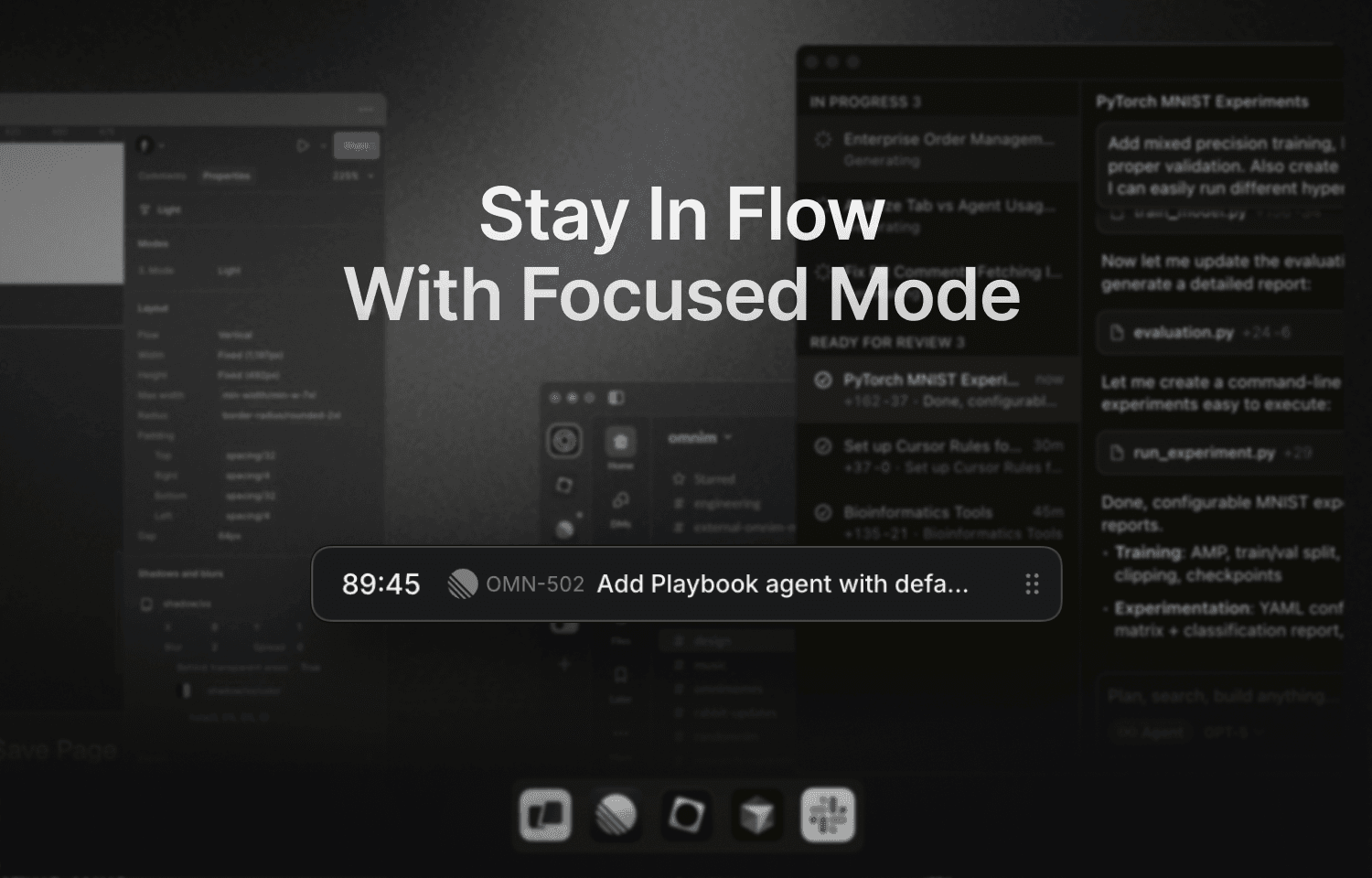
Native macOS timer that stays visible while you work. See remaining time, current task, and session progress without switching windows.
Focused Mode
Enter distraction-free deep work. The focused mode shows only what matters: your current task, notes, and timer. Block distracting apps and websites automatically during sessions.
Slack Status Sync
Optionally update your Slack status during focus sessions. Teammates see "Focusing 🟡" and know not to ping you with non-urgent messages.
How to Set Up Linear + Locu
- Download Locu from locu.app/download
- Connect Linear in Preferences → Integrations → Linear
- Import issues from the task screen (assigned to you or from cycle)
- Start a focus session and select a Linear issue
- Work — time tracks automatically
Real-time sync means changes in Linear appear in Locu within seconds. Complete an issue in Linear? It updates in Locu. Change priority? Same thing.
Who This Is For
Freelance developers billing clients on Linear:
- Accurate time per issue for invoicing
- Export time + task details for client reports
- Never lose billable hours to forgotten timers
Remote engineers tracking focus time:
- See how much deep work you actually did (vs. meetings and Slack)
- Build sustainable daily rhythms with session structure
- Personal notes for context your team doesn't need
Engineering managers (for personal IC work):
- When you're coding, not managing
- Track time on your own issues without imposing tracking on your team
The Bottom Line
Linear is great for team issue tracking. It's deliberately not a time tracking tool.
If you need to track time on Linear issues—for billing, focus measurement, or just self-awareness—bolting on Toggl creates friction and inaccurate data.
Locu integrates directly with Linear to give you:
- Automatic time tracking during focus sessions
- Private notes and task breakdowns alongside issues
- One unified view (no window switching)
- Sustainable 90-minute focus structure
Stop toggling timers. Start working in focused sessions where time tracking just happens.
Track time on Linear issues automatically
Import Linear issues, work in focused sessions, get accurate time tracking. Natural part of your workflow.